



Drafts 5 Sermon Prep with LectServe
Drafts 5 for Mac recently introduced the ability to do some basic scripting in JavaScript as an action in the application. Each time I prepare a sermon, the first step for me is to lookup the readings for the week on LectServe and then paste the readings into Drafts where I can start doing sermon preparation and, eventually, write my sermon. As soon as I saw actions and scripting introduced for Drafts, I knew I’d have to automate my sermon prep process.
Read more...Automated Weekly Sermon Podcast
Each Sunday at Church of the Epiphany we record our sermon using someone’s mobile phone. We started doing this back in September and, for the last three months, editing and uploading these sermons to our website has been a fairly manual process. Starting this month, however, with a combination of JustCast, Dropbox, Hazel, Squarespace, and Auphonic I’ve been able to mosty automate the process.
1. Download & Rename
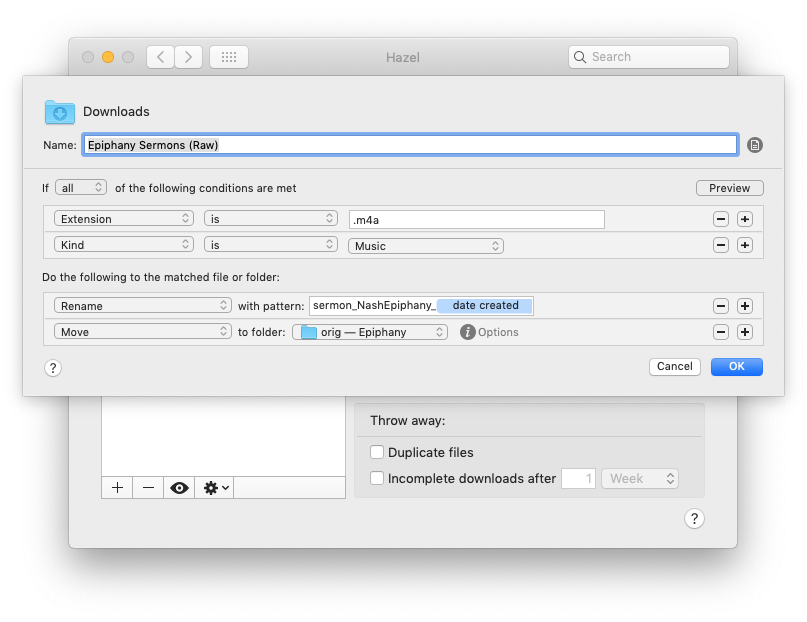
Each week shortly after worship, Fr. Justin e-mails me the audio recording of his sermon from his phone. His Android phone defaults to .m4a for audio, so I’ve setup a simple Hazel rule to monitor my download folder for that extension so the file is quickly renamed and moved off to my external archive drive.